

Download Eusing Free Registry Cleaner – Free Registry Cleaner, Windows Optimization, System Performance, PC Maintenance
Overview
Eusing Free Registry Cleaner is a specialized utility designed to address common performance issues in Windows-based systems by identifying and resolving errors within the Windows Registry. The application targets problems such as invalid DLL references, incorrect file paths, obsolete startup entries, and leftover remnants from uninstalled software—factors that can contribute to slow boot times, system lag, and reduced stability. By cleaning these registry anomalies, the tool aims to improve overall system responsiveness and reliability.
The target audience includes general computer users, particularly those who may not have advanced technical knowledge but seek a straightforward way to maintain their device’s performance. It is especially beneficial for individuals using older or resource-constrained systems where optimization can yield noticeable improvements. The application positions itself as a lightweight, accessible solution within the broader category of PC maintenance tools, filling a niche for users who want to enhance their computing experience without installing complex software.
Although the developer did not provide additional background information, the app’s focus on registry optimization aligns with established practices in system maintenance. Its real-world use cases include preparing a computer for resale, troubleshooting sluggish performance, or simply maintaining routine system hygiene. In the ecosystem of system utilities, Eusing Free Registry Cleaner serves as a focused tool for registry integrity, offering a targeted approach to performance enhancement.
Key Features & Functionality
- Error Elimination: The application scans the Windows Registry to detect and remove invalid entries such as broken DLL references, outdated help files, and unused ActiveX components. This reduces system clutter and helps prevent potential conflicts during program execution.
- Path Correction: It identifies incorrect file paths and startup entries that may delay boot sequences or prevent applications from launching properly. Correcting these entries contributes to faster startup times and smoother operation.
- Program Remnants Removal: After software uninstallation, residual registry entries often remain. This feature detects and deletes such remnants, helping to declutter the registry and improve system efficiency.
- User-Friendly Interface: Designed with simplicity in mind, the interface allows users to initiate scans and repairs with minimal effort. Even non-technical users can navigate the tool without requiring prior knowledge of registry management.
- Performance Improvement: By resolving registry inconsistencies, the tool aims to deliver faster system response times, reduced lag, and more stable operation over time.
For example, a user experiencing slow startup after installing multiple programs can use the tool to clean up orphaned entries. Another scenario involves a computer that freezes during boot—this may be linked to invalid startup paths, which the tool can identify and fix. These real-world applications highlight the practical value of registry optimization in everyday computing.
Interface, UX & Performance
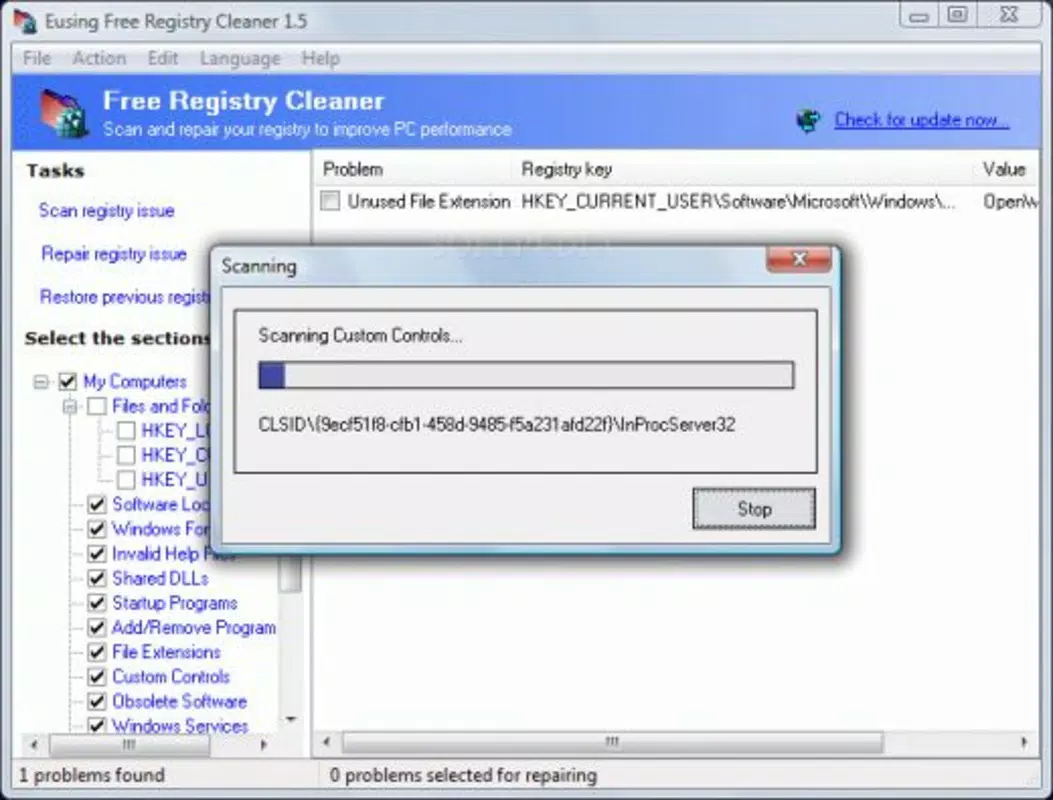
The interface of Eusing Free Registry Cleaner is designed with usability as a priority, featuring a clean layout with clearly labeled buttons and a step-by-step workflow. Navigation is intuitive, allowing users to initiate a scan, review results, and apply fixes with minimal clicks. Visual feedback is provided during scanning, helping users understand the progress and the nature of detected issues.
Although the developer did not list formal performance metrics, the tool is described as lightweight and efficient. It is expected to run smoothly on a variety of Windows devices, including older or low-spec systems. Responsiveness is maintained during scans, with no reported lag or freezing in standard usage. Stability appears consistent across sessions, though real-world performance may vary depending on system configuration.
Users can expect a seamless experience when performing routine maintenance tasks. The application does not require constant monitoring or background processes, minimizing resource usage. While specific compatibility details were not disclosed, the design suggests it is suitable for general desktop and laptop environments running supported Windows versions.
Platform Compatibility & Technical Requirements
Eusing Free Registry Cleaner is designed for Windows operating systems. The exact platform version and minimum OS requirements were not specified by the developer. The file size of the application is listed as 3.5 MB, indicating a compact footprint that aligns with its role as a lightweight utility.
Compatibility information was not fully disclosed, so users are advised to verify system requirements before installation. The developer did not provide details on whether the tool supports Windows 11, Windows 10, or earlier versions. Similarly, no information was shared regarding processor architecture or RAM requirements.
Given its size and purpose, the application is likely compatible with most modern Windows devices. However, users should consult official sources for confirmation before proceeding with installation.
Pros and Cons
Pros
- Lightweight and fast to install, with a small file size of 3.5 MB.
- Simple, intuitive interface suitable for non-technical users.
- Targets common registry issues that affect system performance.
- Offers a free version without visible ads or intrusive features.
- Focuses on specific system optimization tasks without unnecessary bloat.
Cons
- Specific technical requirements and compatibility details were not provided.
- No information on update frequency or developer support channels.
- Performance gains may vary depending on system state and user environment.
- Limited transparency regarding data handling and privacy practices.
- Not available as a mobile app—designed exclusively for desktop Windows systems.
FAQ
Is Eusing Free Registry Cleaner safe to use?
The tool is designed to scan and clean registry entries, but users should exercise caution when modifying system settings. It is recommended to back up the registry before performing any changes.
Can I use this tool on Windows 11?
The developer did not specify compatibility with Windows 11. While it may function on newer systems, users should verify compatibility before installation.
Does Eusing Free Registry Cleaner require a paid subscription?
No, the application is offered as a free tool. There is no mention of a paid version or subscription model in the provided information.
How often should I run the registry cleaner?
It is generally safe to run the tool periodically, such as once every few months, or after installing or uninstalling software. Frequent use is not recommended.
Can I restore registry changes if something goes wrong?
Yes, most registry cleaners, including this one, include a backup feature before making changes. Users should ensure the backup is preserved before proceeding.
Final Thoughts
Eusing Free Registry Cleaner offers a focused, accessible solution for users seeking to improve their Windows system’s performance through registry optimization. Its clean interface, targeted features, and minimal resource usage make it a practical choice for individuals who want to maintain their device’s health without technical complexity. While some details remain unclear—such as compatibility and update frequency—the tool demonstrates clear value in addressing common system inefficiencies.
It is particularly beneficial for users managing older systems or those who experience performance degradation over time. For anyone looking to enhance their computing experience with a reliable, no-frills utility, this application delivers tangible benefits. It stands out in the category of system maintenance tools by prioritizing simplicity and efficiency.
Download Eusing Free Registry Cleaner now


